Tauira Login Guide (2023)
Tauira | Student Login Guide
For your student email, enter your Student ID Number followed by @akonga.twoa.ac.nz (Example: 20000000@akonga.twoa.ac.nz).
- If you don’t know your ID number, please ask your Kaiako (Tutor) or call 0800 355 553
Password format
Your password will be your date of birth in one of the following formats, and is case sensitive:
- ddMonyyyy!! This password includes the two exclamation marks on the end, and is for newer tauira
- ddMonyyyy For returning tauira who enrolled with us prior to 2020
Example: 03Dec1982!! 21Jan1990!!
Common Issues
Error: "That didn't work - We're sorry but *address* can't be found in the akongatwoaac.sharepoint.com directory"
- This normally occurs when you are already logged in with your personal Outlook, Hotmail, or Microsoft account. To get around this, open an incognito window in Chrome and try logging in again:
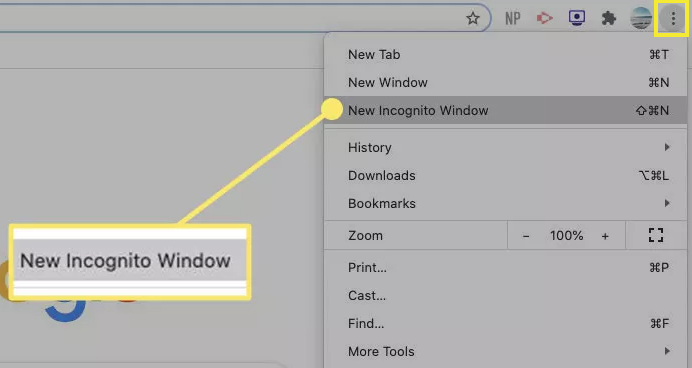
You can also use a keyboard shortcut to open an Incognito window:
- Windows, Linux, or Chrome OS: Press Ctrl + Shift + n.
- Mac: Press ⌘ + Shift + n.
Alternatively if you would like to save your login details (as incognito or In Private windows do not allow you to save these details)
You can create a second profile to use in your internet browser - this works across Edge, Chrome and Safari, and comes in handy if you have a personal or work account and require frequent access to your study and personal/work accounts. It also allows you to save bookmarks related to your study in one place.
Find instructions below, corresponding to the internet browser you use:
Chrome
Edge
Safari
You do not need to sync any other accounts to access your data here, though you can do so if you would like to access the same links etc on another device.